
VPNRice for Android
VPNRice for Android encrypts everything your phone or tablet sends, from your browser and messaging apps to games and updates. Install it from Google Play, tap Connect, and your traffic goes through a VPNRice server instead of straight onto the café, hotel or mobile network you happen to be on.
Same release as Google Play, served from user.vpnrice.com.
 Scan to install on your phone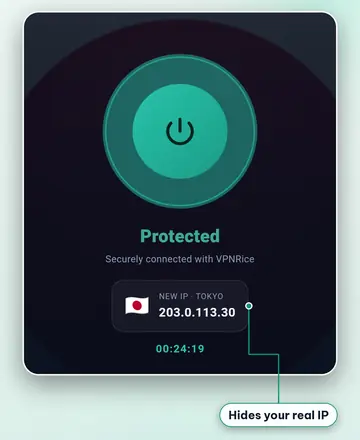
Why VPNRice on Android
One tap, then it stays out of the way
The app picks a server and a protocol for you. Android shows a key icon and a notification while the tunnel is up, so you always know whether you are protected.
Choose which apps use the VPN
Per-app VPN lets you send only some apps through VPNRice, for example your browser and messengers, while a banking app or a local streaming app keeps using your normal connection. Per-app mode runs on WireGuard.
Block connections without the VPN
Android has a built-in kill switch. Turn on Always-on VPN and Block connections without VPN for VPNRice in your phone's settings, and apps can't fall back to an unprotected connection if the tunnel drops.
Ad and tracker blocking
A DNS filter blocks known ad, tracker and malware domains for every app on the phone, not only the browser. Availability depends on your plan; the switch is in the Account screen.
System requirements
| Operating system | Android 7.0 or later |
|---|---|
| Price | Free with optional in-app purchases |
| Download from | Google Play |
| Languages | 23 languages |
How to install VPNRice on Android
- Open Google Play on your phone or tablet, or tap the Google Play button on this page.
- Search for VPNRice or open the listing directly, then tap Install.
- Open VPNRice and tap Connect. The app picks a server near you.
- Android asks once for permission to set up a VPN connection. Tap OK to allow it.
- Optional: open the Account screen to change the protocol or turn on ad blocking, and the app settings to choose which apps use the VPN.
Protocols on Android
- Auto (default) — the app chooses a protocol for you and switches if one doesn’t connect.
- WireGuard — a modern, open-source VPN protocol with a small code base and current cryptography (Curve25519, ChaCha20-Poly1305).
- RiceGuard — WireGuard with extra packet obfuscation, for networks that handle standard VPN traffic poorly.
- RiceGuardX — an encrypted connection over TCP port 443 (VLESS with REALITY), useful on networks that restrict UDP.
Frequently asked questions
Which Android versions does VPNRice support?
Android 7.0 (API level 24) and later, on phones and tablets. The same minimum applies to the Android TV app.
Can I install VPNRice without Google Play?
Yes. Use the Direct APK link on this page; it is an official build hosted on user.vpnrice.com. You may need to allow installs from your browser or file manager the first time.
How do I turn on the kill switch on Android?
Open Android Settings, go to Network & internet, then VPN, tap the gear next to VPNRice, and turn on Always-on VPN and Block connections without VPN. The exact menu names vary a little between phone makers.
Why does per-app VPN switch the protocol to WireGuard?
Choosing individual apps is handled by Android's VPN service together with WireGuard in our app, so the app uses WireGuard while per-app mode is on. Turn per-app mode off to use RiceGuard or RiceGuardX again.
Does VPNRice drain my battery?
WireGuard and RiceGuard are light on battery because they only work when there is traffic to send. RiceGuardX uses a little more power because it keeps a TCP connection open. If battery matters most, leave the protocol on Auto or pick WireGuard.
Can I use the same account on my Android TV?
Yes. Open VPNRice on the TV, choose to sign in with a QR code, and scan the code with the VPNRice app on your phone. No typing with the remote is needed.
Is the Android app free?
Yes. The Free plan includes Free servers and all protocols. Premium is an optional in-app purchase that opens every server; prices depend on your country and are shown in the app.
VPNRice on other platforms
- Android TV
- iPhone & iPad
- Windows
- Chrome
- Firefox
- macOS · In development
- Linux · In development
- Microsoft Edge · Use the Chrome extension
- Fire TV · In development
- Apple TV · In development
- Routers · In development