
VPNRice for iPhone & iPad
VPNRice for iPhone and iPad gives you an encrypted connection on any Wi-Fi or mobile network with one tap. It is a native app for iOS and iPadOS 15.0 or later, available on the App Store, and it shares your account with VPNRice on Android, Android TV and Windows.
 Scan to install on your phone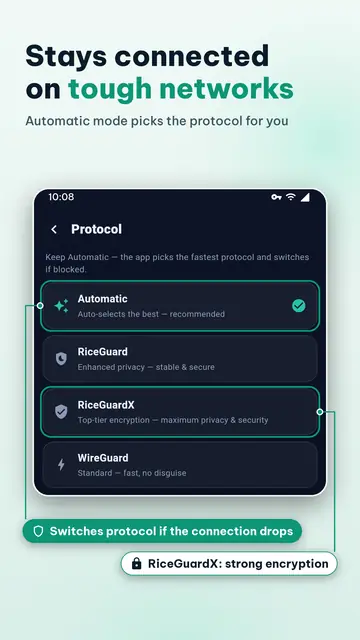
Why VPNRice on iPhone & iPad
Built on Apple's VPN framework
VPNRice uses the system VPN interface, so the VPN icon appears in the status bar and the tunnel keeps running when you switch apps or lock the screen.
Kill switch
When the kill switch is on, iOS keeps traffic inside the tunnel while VPNRice reconnects, so apps don't quietly fall back to your normal connection.
Works on iPhone and iPad
The same app runs on iPhone and iPad. Install it once from the App Store and you can download it on every device signed in with your Apple ID.
Ad and tracker blocking
A DNS filter blocks known ad, tracker and malware domains in apps and in Safari. Availability depends on your plan; the switch is in the Account screen.
System requirements
| Operating system | iOS 15.0 or later (iPhone and iPad) |
|---|---|
| Price | Free with optional in-app purchases |
| Download from | App Store |
| Languages | 23 languages |
How to install VPNRice on iPhone & iPad
- Open the App Store on your iPhone or iPad, or tap the App Store button on this page.
- Search for VPN Rice and tap Get, then confirm with Face ID, Touch ID or your password.
- Open VPNRice and tap Connect.
- iOS asks to add VPN configurations. Tap Allow and confirm with your passcode.
- The VPN icon appears in the status bar. Open Account to change the protocol or turn on the kill switch.
Protocols on iPhone & iPad
- Auto (default) — chooses between RiceGuard and WireGuard. On iPhone and iPad, Auto doesn’t use RiceGuardX; select it yourself when you need it.
- WireGuard — a modern, open-source VPN protocol with a small code base and current cryptography (Curve25519, ChaCha20-Poly1305).
- RiceGuard — WireGuard with extra packet obfuscation, for networks that handle standard VPN traffic poorly.
- RiceGuardX — an encrypted connection over TCP port 443 (VLESS with REALITY), useful on networks that restrict UDP.
Frequently asked questions
Which iOS versions are supported?
iOS 15.0 or later on iPhone, and iPadOS 15.0 or later on iPad, as listed on the App Store.
Why does iOS ask to add a VPN configuration?
Every VPN app on iOS has to register a VPN configuration with the system. It only happens the first time and lets iOS show the VPN status and keep the tunnel running.
What does Auto do on iPhone?
Auto picks between RiceGuard and WireGuard for you. On iPhone and iPad, Auto does not use RiceGuardX; select RiceGuardX yourself in the protocol screen when you need a connection over TCP port 443.
Is there split tunnelling on iOS?
No. On iPhone and iPad all traffic goes through the VPN while it is connected. Choosing individual apps is available in the Android and Windows apps.
Can I use my Android purchase on iPhone?
Your account works on every platform. Purchases are handled by the store you bought from, so restore or manage them in that store; the app shows what your account currently includes.
Does VPNRice work on mobile data?
Yes. The tunnel works on Wi-Fi and on mobile data.