
VPNRice for Android TV
VPNRice for Android TV is built for the remote control: big buttons, a clear connection status and nothing you have to type. It runs on Android TV and Google TV devices, including smart TVs, set-top boxes and streaming sticks, and protects every app on the TV with the same encryption as the phone app.
Same release as Google Play, served from user.vpnrice.com.
 Scan to open the TV listing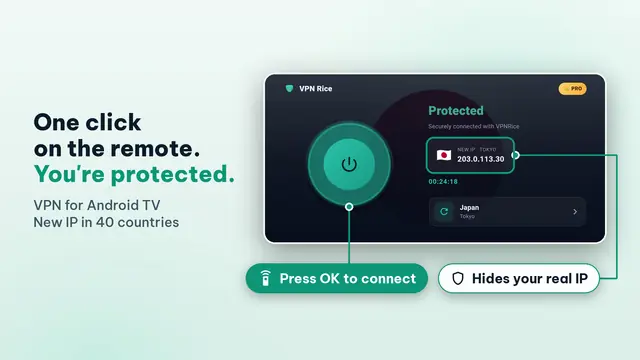
Why VPNRice on Android TV
Made for a remote, not a touchscreen
Every screen works with the D-pad. Connect, change server and switch protocol with a few clicks, and the focused button is always clearly highlighted from the sofa.
Sign in with a QR code
The TV shows a QR code; scan it with VPNRice on your phone and the TV is signed in to the same account. Your Premium plan, if you have one, comes with you.
Covers every app on the TV
VPNRice uses Android's VPN service, so the system and all apps on the TV go through the tunnel, not only one player. You can still pick a server country from the list.
Same protocols as the phone app
WireGuard, RiceGuard and RiceGuardX are all available, with Auto choosing for you. Ad and tracker blocking is available too, depending on your plan.
System requirements
| Operating system | Android TV 7.0 or later |
|---|---|
| Price | Free with optional in-app purchases |
| Download from | Google Play |
| Languages | 23 languages |
How to install VPNRice on Android TV
- On your TV, open the Google Play Store from the apps row.
- Search for VPNRice with the remote or by voice, then select Install.
- Open VPNRice and select Sign in. The TV shows a QR code.
- Scan the code with the VPNRice app on your phone to sign in, or continue on the Free plan.
- Select Connect. The first time, confirm the Android VPN permission prompt with OK.
Protocols on Android TV
- Auto (default) — the app chooses a protocol for you and switches if one doesn’t connect.
- WireGuard — a modern, open-source VPN protocol with a small code base and current cryptography (Curve25519, ChaCha20-Poly1305).
- RiceGuard — WireGuard with extra packet obfuscation, for networks that handle standard VPN traffic poorly.
- RiceGuardX — an encrypted connection over TCP port 443 (VLESS with REALITY), useful on networks that restrict UDP.
Frequently asked questions
Which TVs and boxes are supported?
Devices running Android TV or Google TV with Android 7.0 or later and access to Google Play. That covers most smart TVs with Google TV, Android TV boxes and Chromecast with Google TV.
What if my TV doesn't show VPNRice in Google Play?
Some devices hide apps they consider incompatible. You can install the Direct APK for TV from this page with a downloader app. It is an official build hosted on user.vpnrice.com.
Do I need a keyboard to sign in?
No. Sign in with a QR code: the TV displays it and you scan it with VPNRice on your phone.
Will a VPN affect streaming quality?
Any VPN adds a little distance between you and the service, so choose a server close to you for the smoothest playback. VPNRice does not limit video quality, but the streaming service decides what it shows in each country.
Can I use VPNRice on Fire TV?
Fire TV is not officially supported yet. Fire TV devices can sideload the Android TV APK, but we do not test on them, so some features may not behave as expected.
Does the TV app start the VPN automatically?
You can set Android's Always-on VPN option for VPNRice in the TV's network settings, if your device offers it. Otherwise open the app and select Connect after the TV restarts.
Is the TV app separate from the phone app?
It is a separate listing on Google Play made for TVs, but it uses the same account, servers and protocols as the phone app.